Blood pressure tracker for iPhone
Blood pressure log app: your cuff readings, ready for your doctor
Type in the numbers from your own blood pressure monitor in a few taps. The app labels each reading with its American Heart Association category, charts your morning and evening averages and creates a PDF report for your doctor. It does not measure blood pressure.

Requires a plan: $39.99 per year with a 3-day trial for eligible new subscribers, or $59.99 once for lifetime access (US prices; local prices are shown in the App Store).
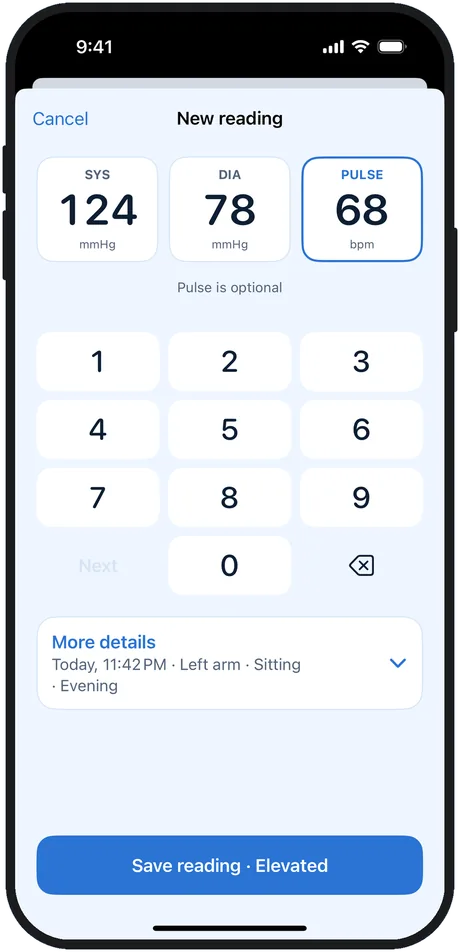
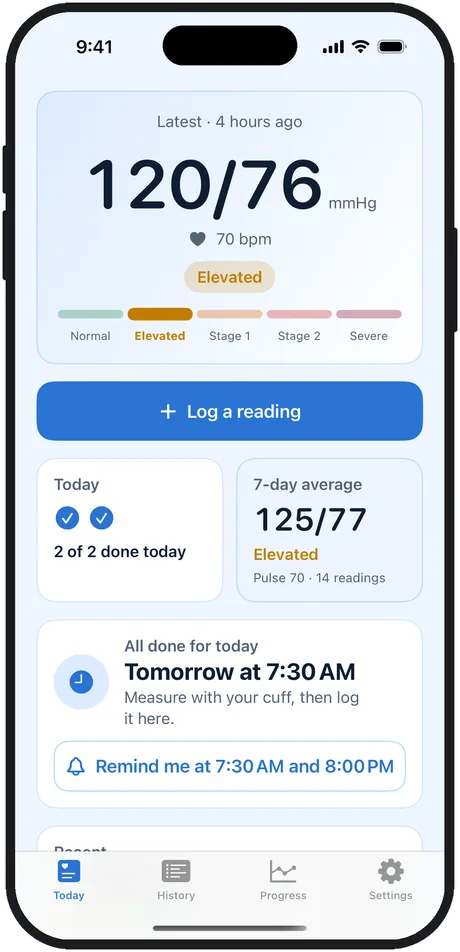
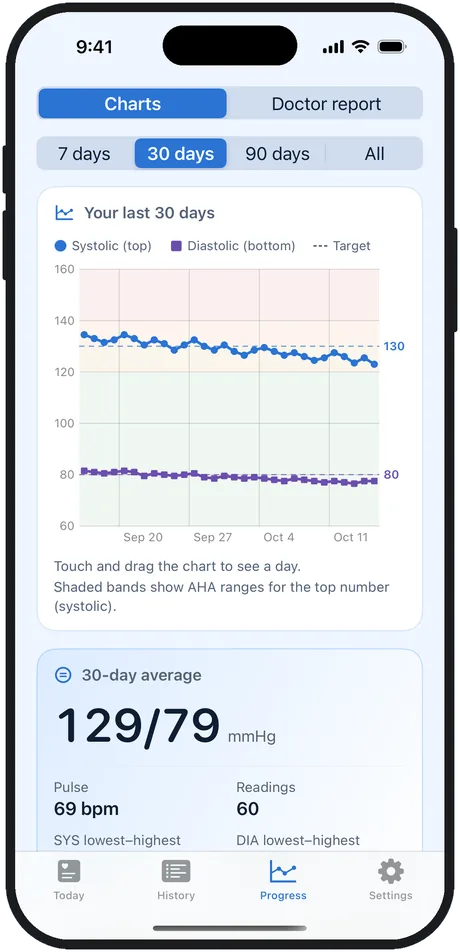
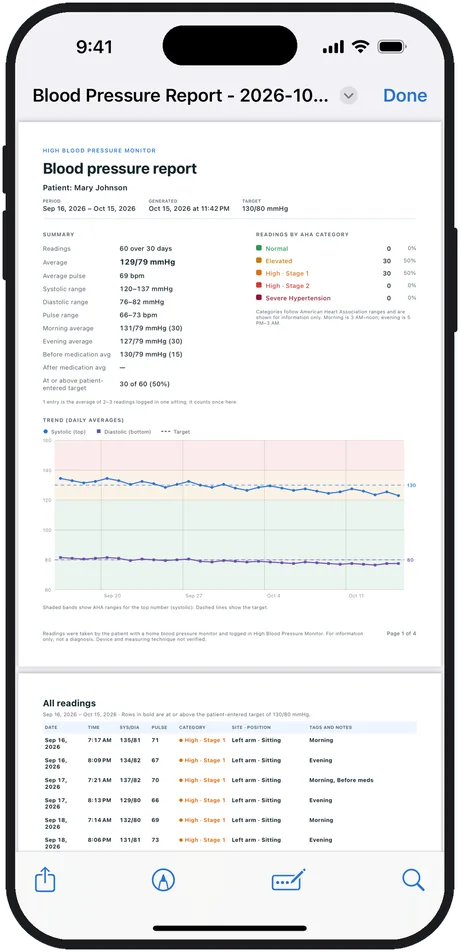
Screens from the app with demo data.
- Logs the readings you take with your own cuff, or brings them in from Apple Health
- No account, no ads, no tracking: readings stay on your iPhone and, if you choose, in Apple Health
- iPhone · iOS 18 or later · 16 languages
What it is
What is High Blood Pressure Monitor?
High Blood Pressure Monitor is an iPhone app for keeping a log of the blood pressure readings you take with your own monitor (cuff); it does not measure blood pressure itself. Each reading is labeled with its American Heart Association category for information, and the app shows 7-, 30- and 90-day trends, morning and evening averages, and a PDF report you can share with your doctor. It works with Apple Health, keeps readings on your device with no account, and needs an annual plan or a one-time lifetime purchase.
How it works
How it works
Type in your cuff reading
Enter the top and bottom numbers and the pulse from your own monitor.
See its AHA category
Each reading gets its American Heart Association category, for information.
Follow your trends
Charts and averages show how your readings look over days and weeks.
Share with your doctor
Create a PDF report with averages, a chart and every reading.
What you can do
What you can do with High Blood Pressure Monitor
Log a reading in a few taps
A large keypad for the top number, the bottom number and pulse from your cuff, plus date and time, arm or wrist, body position, tags such as Morning, Evening, Before meds and After exercise, and a note. Take 2–3 readings about a minute apart and the app saves their average.
See your trends
Charts for the last 7, 30 or 90 days or all readings, with your target line, 7-, 30- and 90-day averages, and morning versus evening averages.
A PDF report for your doctor
Averages, lowest and highest readings, readings per category, a trend chart and a table of every reading for the period you choose. Print it, email it or AirDrop it.
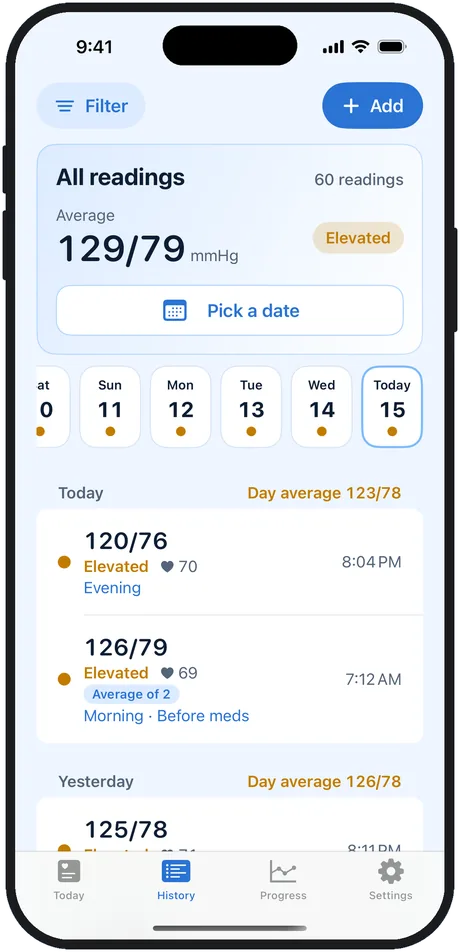
Every reading, day by day
Your full history grouped by day with day averages and tags. Tap a reading to edit it, swipe to delete it, or jump to a date.
Why keep your log in High Blood Pressure Monitor?
Made for people who take their blood pressure at home and want a clear record to bring to their doctor.
The AHA category for every reading
Each reading is labeled Normal, Elevated, High · Stage 1, High · Stage 2 or Severe Hypertension, with a color and a text label. For information only, with links to the American Heart Association sources.
Private by design
No account, no ads, no analytics. Readings stay on your iPhone and, if you turn it on, in Apple Health. The app never stores them in iCloud or sends them to the developer.
Morning and evening reminders
Reminders at the times you choose. They never show your readings on the Lock Screen.
Apple Health, widget and Siri
Save readings and pulse to Apple Health and bring in readings your cuff's app saved there. A widget shows your latest reading, and Siri logs the numbers you say.
See it in action
The facts
High Blood Pressure Monitor at a glance
| Name | High Blood Pressure Monitor (shown as BP Monitor on the Home Screen) |
|---|---|
| What it does | Keeps a log of blood pressure and pulse readings you take with your own cuff or import from Apple Health. It does not measure blood pressure or heart rate. |
| Categories | American Heart Association categories (2025 AHA/ACC guideline) for adults who are not pregnant, for information only |
| Platform | iPhone, iOS 18 or later |
| Price | A plan is required: annual $39.99 per year with a 3-day trial for eligible new subscribers, or lifetime $59.99 one-time purchase (US prices). No free tier. |
| Apple Health | Optional: saves the blood pressure and pulse you enter to Apple Health and imports blood pressure readings (with the matching pulse) from it |
| Data and privacy | No account. Readings are stored on the iPhone and, if you choose, in Apple Health; the app doesn't store them in iCloud. The App Store privacy label is Data Not Collected. |
| Languages | 16 languages; the app follows your App Store country and you can change it in Settings |
| For | Adults who take their blood pressure at home and want a record to share with their doctor |
Quick answers
Frequently asked questions
Does High Blood Pressure Monitor measure my blood pressure?
No. It is a log. You take the reading with your own blood pressure monitor (cuff) and type in the numbers, or bring readings in from Apple Health. The app does not use the camera, flashlight or any sensor to measure blood pressure or heart rate.
How much does it cost?
The app needs a plan to use: an annual subscription at $39.99 per year, with a 3-day trial for eligible new subscribers, or a one-time lifetime purchase at $59.99 (US prices; other countries see local prices in the App Store). The annual plan renews automatically unless you cancel at least 24 hours before the period ends.
Which blood pressure categories does it use?
The American Heart Association categories for adults who are not pregnant, as kept in the 2025 AHA/ACC guideline: Normal (below 120 and below 80), Elevated (120–129 and below 80), High · Stage 1 (130–139 or 80–89), High · Stage 2 (140 or higher, or 90 or higher) and Severe Hypertension (higher than 180 and/or higher than 120 mmHg). The labels are for information only, and guidelines outside the US may use different ranges.
Does it work with my blood pressure cuff and Apple Health?
You can type in readings from any cuff. If your cuff's own app saves readings to Apple Health, High Blood Pressure Monitor can import them, and it can save the readings you enter to Apple Health. The app does not connect to cuffs over Bluetooth itself.
Where are my readings stored?
On your iPhone and, if you turn on sync, in Apple Health. There is no account and no server: the app doesn't store readings in iCloud, and they never reach the developer. Your iPhone's own backup may include the app's data. You can delete all your data in Settings at any time.
Can I share my readings with my doctor?
Yes. The app creates a PDF report for the period you choose with averages, lowest and highest readings, readings per category, a trend chart and a table of every reading. You can print it, email it or share it with AirDrop.
Can the app tell me if I have high blood pressure?
No. The app labels readings with published categories for information, but one reading is not a diagnosis. Only a doctor or other medical professional can confirm high blood pressure. The app has not been reviewed, cleared or approved by the FDA and does not diagnose, treat or give medical advice.
Is there an Android version?
No. High Blood Pressure Monitor is made for iPhone (iOS 18 or later). There is no Android version.

Keep your readings in one place
Download High Blood Pressure Monitor for iPhone and log the readings from your own cuff. Requires an annual plan (3-day trial for eligible new subscribers) or a lifetime purchase.